










BREAKING 🚨: First look at Veo 3.1 samples 👀 Here is a comparison of Veo 3.1 vs Veo 3 for the same benchmark prompt, "Cyberpunk hacker robot working in front of many monitors" It is getting hot in here! 🔥


Veo 3.1 AI Video Generator
Bring your ideas to life with Veo 3.1 on Kify AI. Produce 4K videos complete with native audio and accurate lip-sync. Maintain character identity across scenes using up to 4 reference images, and stretch your content to 148 seconds with video extend.
Public
0 / 8192
Veo 3.1 Video Showcase
Explore demos and walkthroughs highlighting Veo 3.1's 4K output, character consistency, and native audio capabilities
- Veo 3.1 Is Here — 30+ Sec Cinematic AI in 1080p - Bharat Arora
- Veo 3.1 Cinematic 1080p - Visflow
- AI News: Google Veo 3.1, NVIDIA's 15x Speed Boost, Figure 03 Robot - AIQUEST
- Google VEO 3.1 y Un NUEVO REY de los Videos con IA... - Date Un Top
- Novo Google Veo 3.1 com 30 segundos de Geração de Vídeo - Dani Saints
- Create Ultra Realistic AI Macro Videos with Seedream 4 and Veo 3.1 - Dan Kieft
- 【AI動画戦争】Sora 2の一強が終了。Googleの最終兵器『Veo 3.1』がHiggsfieldに実装確定。 - AI様の下僕
Veo 3.1 Video Showcase
Explore demos and walkthroughs highlighting Veo 3.1's 4K output, character consistency, and native audio capabilities
Veo 3.1 Community Reactions on X
Discover how creators and developers are responding to Veo 3.1 on X (Twitter)

🚨 Veo 3.1 is coming soon — exclusively on Vadoo AI. This isn’t just another update — it’s evolution. 🎬 30-second video generation 🎧 Native audio support 💎 1080p ultra-real output ⚡ Faster. Smoother. More cinematic than ever. And here’s the deal — The first 20 retweets get Show more

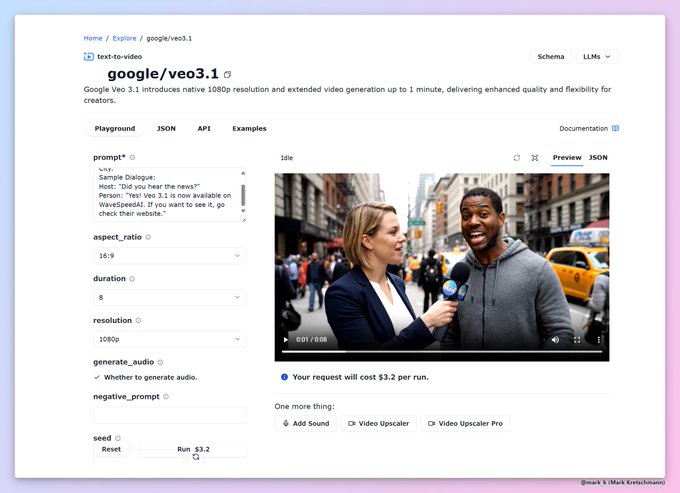
Veo 3.1 is out! on @wavespeed_ai * Resolution 1080p * Maximum video length 1 minute (!) * Price $3.2 per video

Google Veo 3.1 has now surfaced on @wavespeed_ai 🚨 All of the details: * Resolution 1080p * Maximum video length 1 minute (!) * Price $3.2 per video * Native audio generation with dialog You can see a demo video with excellent quality!
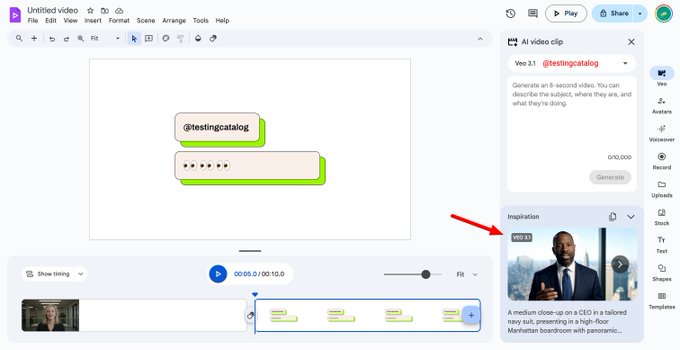
Google made Veo video generation and AI Avatars available on Google Vids for more users! Google Vids is the only Google product that contains hidden traces of Veo 3.1

【🚨 Say Goodbye to AI Video "Fails"! Google Veo 3.1 will land on WaveSpeedAI soon!】 Your main character won't change annoying details anymore! 🔥 Veo is dropping an epic evolution that solves consistency nightmares: 🎬 Ultimate Character Consistency: No more AI "face Show more


Lol, @higgsfield_ai already listed Veo 3.1 in their platform 😏 @testingcatalog @ai_for_success
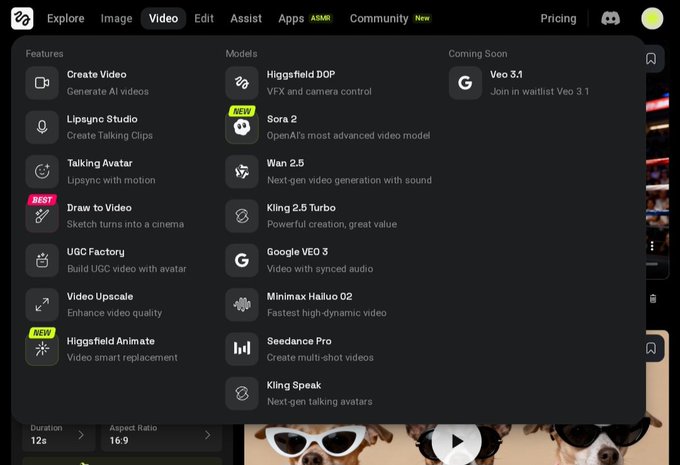
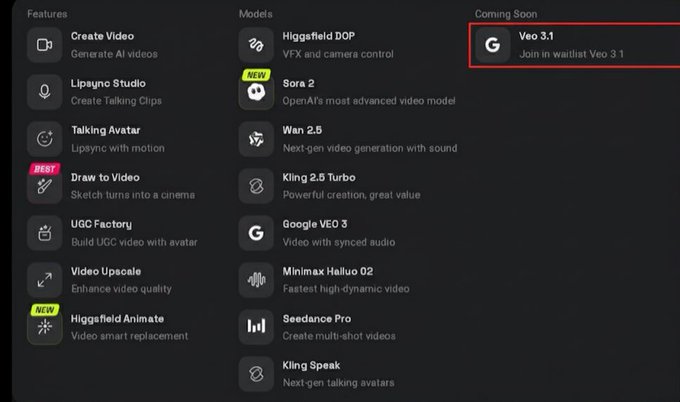
BREAKING 🚨: Veo 3.1 appears on Higgsfield waitlist. Veo 3.1 may be imminent. Sora 2 was in the waitlist just days before release

It is insane .. My First Video on Veo 3.1 The truth about Veo 3.1 is that it can produce 8-second videos. Available on GenVR.ai via @wavespeed_ai It supports 16:9 and 9:16 aspect ratios, with significantly improved emotion.

Veo 3.1 just dropped. 1080p. 1-minute videos. $3.20 per clip. This might be the moment short-form AI cinema becomes real. The question is; can it hold character consistency and audio continuity over a full minute?
About Veo 3.1
Google DeepMind's latest video model with 4K clarity, integrated sound, and long-form capabilities
4KResolution
1stLip-Sync Audio
148sVideo Extend
4Reference Images
Veo 3.1 is the newest video generation model from Google DeepMind, launched in January 2026. It produces crisp 4K footage with native audio that stays in sync with on-screen dialogue. You can supply up to 4 reference images for consistent character appearance, and chain clips together for up to 148 seconds of continuous video.
4KResolution
1stLip-Sync Audio
148sVideo Extend
4Reference Images
About Veo 3.1
Google DeepMind's latest video model with 4K clarity, integrated sound, and long-form capabilities
Veo 3.1 is the newest video generation model from Google DeepMind, launched in January 2026. It produces crisp 4K footage with native audio that stays in sync with on-screen dialogue. You can supply up to 4 reference images for consistent character appearance, and chain clips together for up to 148 seconds of continuous video.
Veo 3.1 Capabilities
Explore what Veo 3.1 offers: 4K clarity, integrated sound, and powerful creative controls
Ultra-HD 4K Output
Render videos at full 3840x2160 resolution. Ideal for large screens and professional workflows where you need room to crop or reframe in post.
Native Audio & Lip-Sync
Automatically produces speech, ambient sounds, and effects that match the visual content. Speaking characters receive accurate mouth movements synced to their dialogue.
Character Consistency via References
Supply up to 4 reference images to lock in how characters, props, or environments look. Essential for multi-scene storytelling with recurring subjects.
Clip Extension to 148s
Seamlessly continue any Veo-generated video by appending new segments. The system reads the final second of footage to match motion and visual style across extensions.
Start & End Frame Control
Define both an opening and closing image, and let Veo generate the transition between them. Perfect for connecting separate shots or building smooth scene changes.
Portrait Mode (9:16)
Produce vertical videos natively without cropping from landscape footage. Optimized for TikTok, YouTube Shorts, and Instagram Reels.
Flexible Resolution Options
Pick from 720p, 1080p, or 4K output. Both landscape (16:9) and portrait (9:16) orientations are available at every resolution tier.
Extended Prompt Support
Craft detailed scene descriptions up to 4,000 characters. Built-in translation and prompt enhancement tools help you get the most from every generation.
Veo 3.1 Questions & Answers
Still have questions?
Veo 3.1 is a video generation model built by Google DeepMind and released in January 2026. Key highlights: it is the first model to deliver 4K (3840x2160) output, it includes native lip-synced audio, supports up to 4 reference images for character consistency, extends clips to 148 seconds, and offers first/last frame control.
You can choose between 720p, 1080p, and full 4K (3840x2160). Every resolution supports both landscape (16:9) and portrait (9:16) aspect ratios.
You can upload between 1 and 4 images that define the appearance of specific characters, objects, or scene styles. The model uses these references to maintain visual consistency whenever those elements appear in your video.
Yes. The Video Extend feature reads the last second (24 frames) of your clip and generates a continuation of about 7 seconds. You can repeat this process up to a total of 148 seconds. This only works with clips originally created by Veo models.
You supply a starting image and an ending image. Veo then generates the video that bridges the two, creating a smooth transition. It is particularly useful for connecting separate shots or building scene transitions.
Absolutely. Veo 3.1 generates native 9:16 video up to 4K resolution, so you do not need to crop from horizontal footage.
Veo 3.1 produces dialogue, ambient sound, and sound effects automatically as part of the video. Characters who speak get lip-sync applied to their mouth movements. This audio capability works across all modes: text-to-video, reference-to-video, first/last frame, and video extend.
Standard quality: 32 credits per second (4s clip = 128, 6s = 192, 8s = 256 credits). Fast mode: 15 credits per second. Reference-to-video: 32 credits per second. Video extend: 320 credits (standard) or 90 credits (fast) per extension.
Creating Videos from Text with Veo 3.1
Use Google DeepMind's Veo 3.1 to produce high-quality videos with synchronized audio directly from your text descriptions
1
Describe Your Scene2
Set Output Preferences3
Generate and PreviewWrite a prompt covering the action, environment, camera angles, and any dialogue or sound effects you want. You have up to 4,000 characters. Built-in tools can translate or refine your prompt.
Animating Images with Veo 3.1
Turn still images into moving video clips using Veo 3.1, complete with native audio and natural motion
1
Select Your Starting Image2
Define the Motion3
Render and ReviewUpload a PNG, JPEG, or WEBP file (up to 50 MB). A well-composed image with a clear subject yields the best animation quality.
Using Veo 3.1 with Reference Images
Maintain consistent characters and scenes across your videos by providing up to 4 reference images
1
Provide Reference Images2
Craft Your Scene Prompt3
Generate and VerifyUpload 1 to 4 images (PNG, JPEG, or WEBP, each up to 50 MB). These establish the visual identity of characters, objects, or environments you want to reuse.
Extending Videos with Veo 3.1
Append new footage to any Veo-generated clip, building sequences up to 148 seconds
1
Load Your Existing Clip2
Guide the Continuation (Optional)3
Extend and PreviewUpload the Veo-generated video you want to continue (up to 50 MB). Only videos originally produced by a Veo model are compatible with this feature.
Flexible AI Pricing
Pay-as-you-go credits or subscription plans. No hidden fees, cancel anytime.